How to Check Bike e-Challan 2025 in Punjab
Checking a bike e-challan in Punjab has become extremely simple after the digital traffic system launched by the Punjab Safe Cities Authority (PSCA). Instead of visiting traffic offices or waiting in long queues, bike owners can now view their fines online within seconds. With just a motorcycle registration number and the owner’s CNIC, all challan information is available instantly.
Every time a rider commits a traffic violation, PSCA cameras and ANPR technology automatically capture the motorcycle’s number plate and generate a digital challan. This challan is linked to the vehicle owner’s information. Because of the automated nature of this system, it is important for every motorcyclist to check their challans regularly to avoid extra penalties or complications in future documentation.
This guide explains every available method to check, download, and pay bike e-challans in Punjab. It also includes tips to avoid violations, solutions for missing number plates, and frequently asked questions for riders.
What is a Bike e-Challan in Punjab?
A bike e-challan is a digital traffic fine issued when PSCA cameras detect a violation. Using advanced CCTV, ANPR, and the central traffic database, the system automatically records the incident and attaches it to the motorcycle’s registration details.
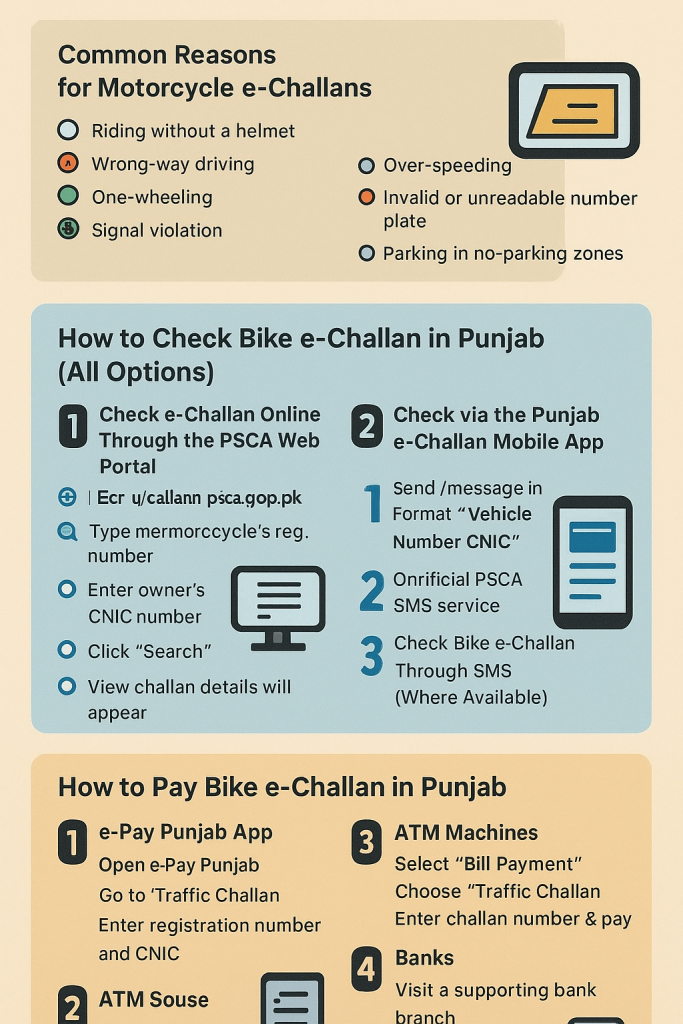
Common Reasons for Motorcycle e-Challans
Motorcycles are captured for several types of violations, including:
- Riding without a helmet
- Entering the wrong lane or driving on the wrong side
- Performing stunts such as one-wheeling
- Ignoring traffic signals
- Driving at unsafe or excessive speeds
- Using fancy, damaged, or unreadable number plates
- Parking in restricted or no-parking areas
How to Check Bike e-Challan in Punjab
1. Check e-Challan Online Through the PSCA Web Portal
This is the simplest and fastest way for most bike owners.
Steps:
- Open the official challan portal:
https://echallan.psca.gop.pk - Type your motorcycle’s registration number.
- Enter the owner’s CNIC number.
- Click Search.
- Your challan details will appear, including violation date, type, amount, and payment status.
2. Check via the Punjab e-Challan Mobile App
PSCA’s mobile app is another quick method to view all your traffic fines in one place.
Steps:
- Download Punjab e-Challan from the Google Play Store.
- Open the app and choose Vehicle Inquiry.
- Enter the bike number and CNIC.
- View all pending or paid challans linked to the vehicle.
3. Check Bike e-Challan Through SMS (Where Available)
Some districts offer an SMS-based service for challan inquiry.
Format
Send a message in this format:
“VehicleNumber CNIC”
to the official PSCA SMS service (if operational in your city).
Note: Not all Punjab cities currently support this feature.
How to Pay Bike e-Challan in Punjab
You can pay your motorcycle challan using several online and offline methods.
1. e-Pay Punjab App
- Open the e-Pay Punjab application.
- Go to Traffic Challan.
- Enter your registration number and CNIC.
- Pay using JazzCash, Easypaisa, bank card, or online banking.
2. ATM Machines
- Insert card at any supporting ATM.
- Choose Bill Payment → Traffic Challan.
- Enter challan number and confirm payment.
3. Banks
- Visit a bank branch that processes e-challans.
- Provide your challan print and CNIC.
- Pay at the counter.
4. NADRA e-Sahulat & Citizen Service Centers
- Visit any nearby CSC or NADRA e-Sahulat center.
- Present your challan slip and pay in cash.
If You Have a Missing or Damaged Number Plate
If your bike’s plate is unreadable or missing, PSCA cameras may issue challans because the system cannot detect the plate properly.
What to Do:
- Apply for a duplicate plate at your nearest Excise Office.
- Keep a temporary paper plate until the new one arrives.
- You can still check challans using your bike registration number and CNIC.
How to Avoid Future Bike e-Challans
Following traffic rules not only avoids fines but also ensures road safety.
- Always wear a helmet
- Use only original Punjab-issued number plates
- Avoid overspeeding
- Follow traffic signals and lane discipline
- Do not use fancy or decorative plates
- Avoid stunts such as one-wheeling
- Park only in designated spaces
FAQs
1. Can I check my bike challan without a CNIC?
No. The system requires both the registration number and CNIC to show challans.
2. Why is my challan not appearing online?
It may take 24–48 hours for new violations to be uploaded to the system.
3. Can I pay the challan in cash?
Yes. You can pay through banks, ATMs, or e-Sahulat centers.
4. How can I download or print the challan?
Visit the PSCA portal, enter the required details, and download the slip.
5. What happens if I don’t pay the e-challan?
Unpaid challans can block:
- Token tax renewal
- Ownership transfer
- Clearance for traffic-related documents
6. Can I check challan details for someone else’s bike?
Yes, if you have their bike number and CNIC.
7. Is this service available in all Punjab cities?
Yes, the system covers Lahore, Rawalpindi, Multan, Faisalabad, Gujranwala, and most other districts.